


CCMS Knowledge Base
- Accessing Courseware
- Information for Hands-On Classes
- Claiming CME Credits for CCMS Programming
- Tracking Your Progress in the CCMS Program
- Preparing for and Registering for the Examination
- How to Register for Health meets Food: The Culinary Medicine Conference
- Contact Information
Accessing Courseware
Video Instruction for Accessing Courseware
It is very important for you to review the video navigation instructions for your courseware. There is also a link within your courseware to the video in your dashboard.
This is a requirement prior to starting your courseware.
How to Access Your Courseware
To access your account use the login button located in the upper right hand corner on the navigation bar.
Your email address is your username. Enter it and the password you created to access payment. These are your login credentials for your courseware.
If you have prior access from registering for an event such as at your school, an online Webinar or the yearly conference, please use those previously established credentials in order to avoid creating a new account. Duplicate accounts can not be merged.
Your courseware can be found here: https://culinarymedicine.org/my-account-2/eb_my_courses/
Information for Hands-On Classes
What To Do Before All Hands-On Cooking Classes
Hands on learning is an important part of the curriculum. Four live or virtual classes are required.
We do, however allow unlimited participation in virtual classes for those who wish to participate in more than four classes.
To register for class go to:
Please do not create a new login as that creates a new account that is not tied to your existing coursework.
For those in the CCMS program, Cecilia Hatfield can provide you with a code to enter at checkout that provides you with free registration.
After choosing your preferred dates, check out using your courseware credentials.
If you have never taken a hands-on module before, complete the lecture and quiz for Module 1ks - Safety and Sanitation Module. You only have to complete this once.
Before each hands-on class, complete the module’s corresponding online pre-class lecture, reading, and quiz BEFORE arriving for your module, as they provide an important foundation for your work in the kitchen.
In addition, the “pre-class” work for each module has an associated quiz to receive AMA PRA CME credit and to claim credit toward qualifying for the certification exam.
For Virtual Hands-on Cooking Classes
You will receive detailed instructions on choosing your recipes and group about a week prior to the virtual class date. Your case study will go out via email the day of class.
For In-person Hands-on Cooking Classes
Attire in the Kitchens
Please wear comfortable clothing, but leave dangling jewelry and very loose-fitting items at home. These requirements are for your personal safety and pursuant to the local health inspector.
Knives, disposable aprons, and kitchen supplies will be provided.
You absolutely must wear closed-toe shoes to the kitchens in order to participate! NO EXCEPTIONS WILL BE MADE.
You are also required to wear a head covering. Please bring a hat, scarf, etc., or you will be provided with a hairnet.
Claiming CME Credits for CCMS Programming
How to Claim Credit for Pre-Course Work
Please download this PDF and follow the instructions to register with the GWU CME system. If you are having issues, please reach out to Kerri Dotson at kdotson@culinarymedicine.org.
You must receive a passing grade of 7/10 on your module quiz in order to claim credit for the quiz. If you do not pass the quiz the first time, you may retake it.
Once a passing grade is received, navigate back to the main courseware page and scroll down to the quiz. You will see a “Claim credit” option. Select to add the credit to your GW account.
How to Claim Credit for Hands On Class
After a hands-on class you will receive an email with a class code to text to register that class and to obtain your certificate and credits. If you have not registered in the CE system, please review the video above on claiming credit and paring your mobile to your account.
You must print a PDF from the GWU CME system and email a copy of your hands-on certificate to cecilia@culinarymedicine.org for addition to your account and proper completion tracking.
1. You will have to set up an account with GWU prior to completing the claim for credit here.
After you create an account, please pair your mobile number to your account.
2. Attendance Code
After attending a hands-on class you will receive an email with a unique 6 digit code to text in order to record your attendance.
You will text that code to this phone number: (202) 902-9966
Your attendance will be recorded and credit will be automatically applied along with granting access to your CME certificate.
If you have not paired your mobile number to the account you will receive an error message in response to texting the code.
3. Complete the evaluation and download your certificate
http://cme.smhs.gwu.edu/my/activities/pending
Click the link above to access your Pending Activities list. Once your attendance has been recorded, it will show up on your activities list.
Click into the activity, then choose the Start Tab.
Click Start and follow the instructions to complete the evaluation and download certificate.
Note: if you do not see a Start Tab but rather “Register,” this indicates that you still need to text the unique 6 digit code to confirm you attendance.
Attach both claiming credit instructions and pairing mobile number instructions
Specific Instructions for Pairing Mobile Number on a Mobile Device
Download this PDF for instructions in pairing your mobile device.
Specific Instructions for Pairing Mobile Number on a Computer
Download this PDF for instructions in pairing your computer to claim CME.
Tracking Your Progress in the CCMS Program
How To Track Module Completion Progress
On the right side of your dashboard, you’ll see a block of tiles. Each of these represents a module. If you hover over each tile you can view the module number.
Online Programming and Quiz Completion Tracking
After completing a quiz, the system will automatically trigger credit in the GWU CME system that you have been awarded credit and it will document that information in your progress tracking block on the right side of the page.
You may see some activities that are no longer available for completion. These are labelled “retired” and are for participants who started the program prior to 2021.
Blue indicates that you have not yet started a module.
Yellow means started but not submitted or not passed.
Green indicates that the task is complete.
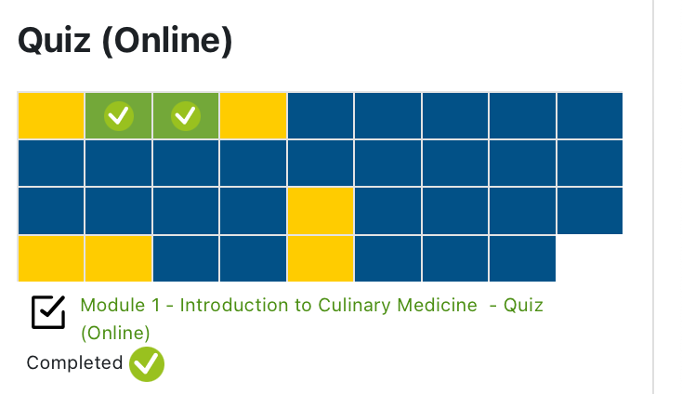
In this example the cursor is hovering over the Module 1 (green check) box and displaying that respective module’s status. Hovering over each individual block will reveal your progress for that particular module.
Hands-on Cooking Class Completion Tracking
After a hands-on class you will receive an email with a class code to text to the GWU CME system. This will trigger your CME credits.
To document tracking send a copy of your hands-on certificate to cecilia@culinarymedicine.org for addition to your account. Your hands-on credit is manually applied and will trigger progress tracking.
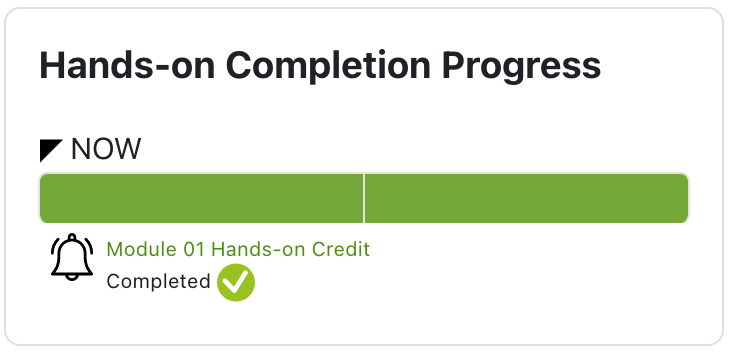
In this example the cursor is hovering over the green box on the left and the system will reveal which modules you have completed. Note you must complete at least 4 hands-on modules to qualify for the certification exam.
Preparing for and Registering for the CCMS Examination
Preparing for the Examination
There are very important supporting documents at the top of the page in your courseware.
This information persists on every page.
There is a link to the CCMS practice exam that you can use.
The link labelled Professional Testing Corporation Handbook and the CCMS Examination Reference guide provide guidance on preparing for and taking the examination as well as all of the examination requirements. These are very important documents and you should study them prior to contacting the ACCM or PTCNY with any questions.
What Are The Steps To Register For The Exam?
Once you have completed the quizzes for all available modules, the quizzes for the two required readings, and the evaluations for at least the 4 required hands-on classes, email cecilia@culinarymedicine.org and your credits will be audited and a candidate number will be requested for you.
How Long Will Exam Results Take?
Results are generally available approximately 2 weeks after the exam period closes or after the last exam is administered. Results will be sent to you via email directly from Professional Testing Corporation, our testing partner.
We do not receive these results until after all candidates have been notified of their scores by PTCNY.
Please do not email the ACCM requesting your results.
How to Register for Health meets Food: The Culinary Medicine Conference
How To Register for Health meets Food: The Culinary Medicine Conference
One year of conference attendance is covered by your tuition and may be used any time during the 24 months allotted to complete the program.
Please email cecilia@culinarymedicine.org for your registration code.
Please note: conference attendance is not mandatory to complete the program.
Contact Information
Who Do I Contact With Questions?
For all CCMS related inquiries: cecilia@culinarymedicine.org
For all CME/CE related inquires: kdotson@culinarymedicine.org
For all CCMP inquiries: chefkamprdn@culinarymedicine.org
For curriculum licensing inquiries: culinarymedicine@icloud.com
For account access issues: webmaster@culinarymedicine.org


